
The “Plot Twist” Method: Learning Database Design When the Requirements Lie to You
You know what nobody tells students about database design? Real projects don’t arrive as clean bullet points.
They show up as half-truths, last-minute changes, and “Oh yeah… we forgot one thing.”
So instead of teaching you to memorize rules, this post teaches you how to think like a database designer when the world is messy.
Because the best schema design isn’t the one that’s “perfect”—it’s the one that survives the next plot twist.
If you like sketching ideas visually, tools like
https://www.dbdesigner.net
and
https://erd.dbdesigner.net
can help you map your thinking into ER diagrams, but your real superpower is learning
how to model reality.
The Story: Your First “Simple” Student Project (That Turns Into Chaos)
Your class is building a campus app called StudyBuddy.
It starts harmless:
- Students create study groups
- They schedule sessions
- They invite other students
Easy. You open your ER diagram tool, throw down a few tables, and feel like a genius.
Then… the professor drops the twist:
“Actually, a study group can have multiple meeting locations. Also, guests can join without accounts.”
Suddenly your “clean” model is sweating.
What You’re Really Designing: A System That Will Change Its Mind
When students learn database design, they often assume the goal is to capture the world “correctly.”
But real-world schema design is more like designing a backpack:
- It should hold what you expect
- It should survive what you didn’t expect
- It shouldn’t fall apart when you add one more thing
The biggest skill isn’t memorizing “right answers.”
It’s spotting where your design will crack under uncertainty.
Here’s a guiding mindset:
“Model the decisions the app must make, not just the nouns in the description.”
Bad Design vs Good Design: The “Invite” Trap
Let’s zoom into one small feature: invitations. Students commonly treat it like a simple yes/no relationship.
But invites are sneaky—because invites have a life story.
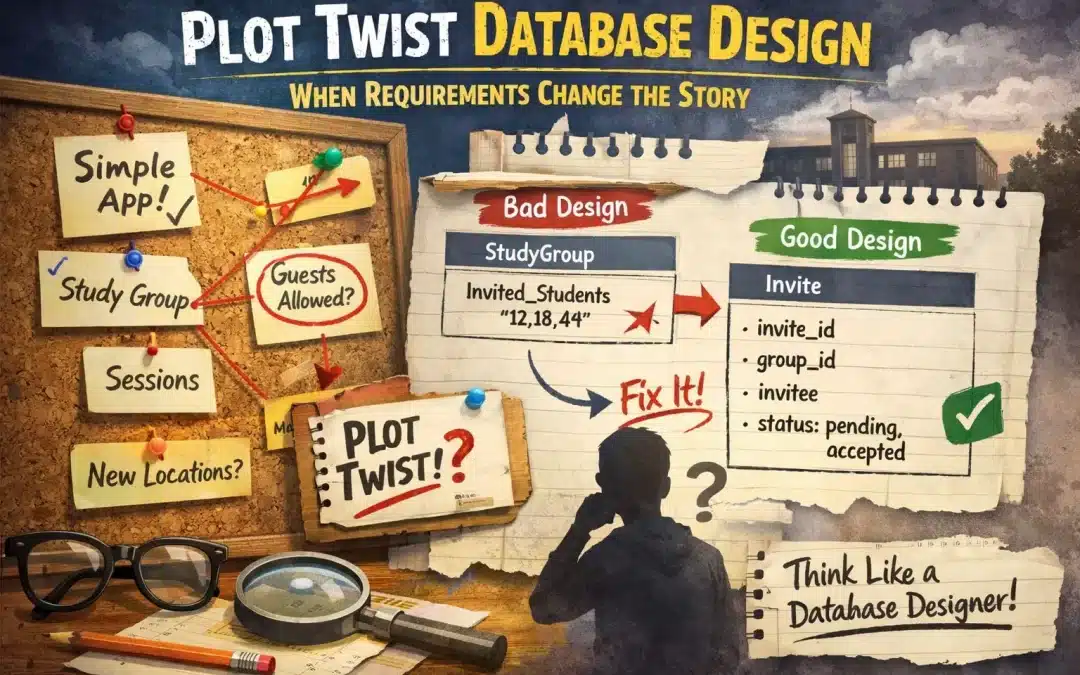
❌ Bad Design: “Just add a column” thinking
You create a table like this:
StudyGroup
- group_id
- name
- invited_students   (text like: "12,18,44")
At first, it “works.” Then you realize:
- You can’t tell who invited whom
- You can’t store invite status (pending/accepted/declined)
- You can’t handle guests without accounts
- You can’t answer: “How many invites were ignored?”
The schema didn’t break because you typed it wrong.
It broke because it had no place for the story.
✅ Good Design: Treat invitations like events
Instead, you model invites as their own thing:
Invite
- invite_id
- group_id
- inviter_student_id
- invitee_student_id (nullable for guests)
- invitee_email      (nullable for students)
- status             ("pending", "accepted", "declined")
- created_at
Why this design wins:
- It captures what happened, not just “who belongs”
- It handles both students and guests
- It supports real app questions (and future features)
It’s not “more complicated.”
It’s more honest.
The Designer’s Lens: Find the “Hidden Verbs”
Most students design databases by collecting nouns:
Student, Group, Session, Course…
But the best database designers hunt for verbs:
- Join
- Invite
- Cancel
- Reschedule
- Check in
- Report
Verbs often become the most important tables—because verbs create relationships with meaning.
That’s where your ER diagrams go from “diagram art” to actual system logic.
Clue #1: Anything with a status
If something can be pending, approved, cancelled, or expired…
that’s not “just a column.” It’s a process.
Clue #2: Anything that changes over time
If you need to know what it used to be,
you may be dealing with an event or history—not a static attribute.
Clue #3: Anything people argue about
If two teammates debate “what this means,” your database probably needs a clearer model.
Confusion is a schema warning sign.
One Quote to Keep You Dangerous (In a Good Way)
“A great schema doesn’t just store data—it protects your future self from your past assumptions.”
Thinking Exercise: Design for the Next Surprise
Here’s a challenge that feels small… until it isn’t.
Imagine your StudyBuddy app adds this feature:
“A single study session can be co-hosted by two groups.”
Your Task (No coding allowed)
- Sketch a quick ER diagram of your current design
- Find the exact place your model breaks
- Fix it without duplicating session rows
If you’re using a diagram tool, try building it in
https://erd.dbdesigner.net
and see how your relationships evolve.
Hint: Watch your relationship assumptions
Students often lock in a relationship too early:
- “A session belongs to exactly one group.”
That sentence sounds harmless.
But it’s a rule you just hardcoded into the database.
Ask yourself:
- Should sessions connect to groups directly?
- Or should there be a link table that lets reality be flexible?
The goal isn’t to predict every feature.
It’s to avoid designs that collapse when the app grows up.
How to Practice Database Design Like a Pro Student
Here’s a way to level up fast, without drowning in boring theory:
- Start with one messy scenario (not ten clean requirements)
- Draw the relationships before you name every column
- Ask “what changes?” and “what gets disputed?”
- Model actions as data (invites, approvals, cancellations)
- Rewrite one assumption and see if the schema survives
That’s how you learn schema design as a thinking skill—not a memorization contest.
Mini Challenge (5 minutes): Break Your Own Schema on Purpose
Pick any system you know—club signups, online games, food delivery, class projects.
Then write down one requirement you didn’t include the first time.
Examples:
- “People can delete accounts, but their history must remain.”
- “A person can belong to multiple roles at once.”
- “Two different things can share the same name.”
Now update your ER diagrams and see what bends, what snaps, and what surprisingly survives.
That’s real learning.
Recent Comments